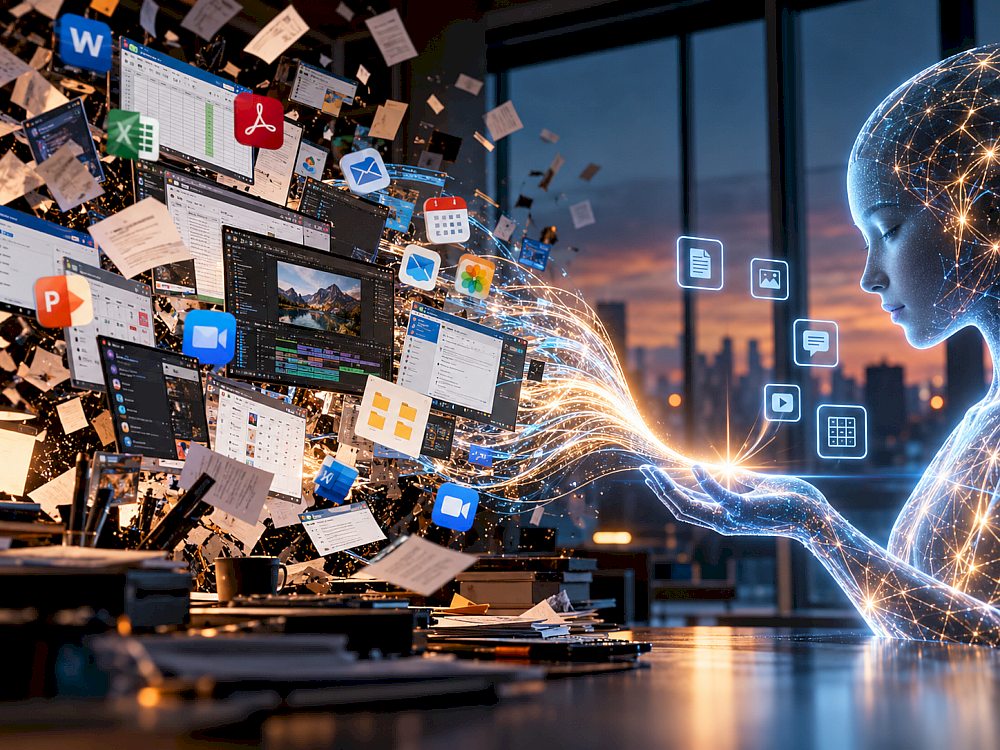
Today, computer work still usually begins by choosing an application. Need to write? Open Word. Calculate a budget? Excel. Build slides? PowerPoint. Edit a photo? Photoshop. Find a file? File Explorer. Edit video? DaVinci Resolve or Premiere.
Forecast details
In 2026, another model is beginning to emerge. Instead of choosing a tool, the user describes the outcome: “find these files, analyze them, create a table, make a chart, prepare a short presentation and draft an email.” The AI decides which applications, models, files and services are needed.
Microsoft introduced a new Copilot with Home, Code and Autopilot in September 2026, pushing a single AI layer deeper into everyday documents and workflows. Microsoft is also expanding agentic work, while Word, Excel and PowerPoint can already carry out multi-step app-native Copilot actions.
Windows AI now includes App Actions, MCP and Agent Launchers — mechanisms that expose application capabilities to AI agents. Apple is moving in a similar direction: Siri AI combines personal context, onscreen awareness and systemwide app actions. OpenAI previously demonstrated a Computer-Using Agent that can interact with graphical interfaces through buttons, menus and text fields.
ORBK.NET’s current estimate is that by the end of 2030 one universal AI will become the main interface to dozens of familiar PC applications and let users complete most common tasks without manually opening the specialist app for the core operation. Probability: about 75%, with a working range of 70–80%. Confidence: 68/100.
But “replace apps” does not mean Word, Excel, Photoshop, browsers or DaVinci disappear. What is more likely to disappear is the need to open them constantly and know how to operate each interface.
Today’s PC is organized around applications
The current desktop model was built decades ago. The user chooses an app, opens a file, finds a command in a menu and performs the sequence manually.
To produce a report, someone may find an Excel file, clean data, write formulas, move conclusions into Word, build a presentation and open email. But the person did not really want Excel or PowerPoint. They wanted a completed report ready to send.
AI agents are beginning to remove the gap between intent and tools.
From “which app should I open?” to “what should happen?”
Today, “remove the background from this photo” becomes a chain of interface actions. In an agent-first model, the instruction stays at the level of intent: “remove the background and make a square product image.”
The AI determines the required operations. The professional application may still do the underlying work, but the user does not necessarily need to see its interface.
Applications can become collections of actions for AI
App Actions and similar mechanisms change the role of software. Instead of being only a window that a human must open, an application can expose individual capabilities: create a document, export a PDF, edit an image, add an event or convert a file.
The AI sees available actions and assembles a workflow across several tools. To the user, this feels like one assistant. Underneath, it may involve many applications, local models, cloud services and system APIs.
AI can also control old apps the way a person does
If an application has no modern API, an agent can still look at the screen, click buttons, type text and navigate menus. Computer-use models have already shown that this is possible.
GUI control is less reliable than a direct API, but it means legacy software can still participate in a universal agent workflow. By 2030, both methods are likely to coexist: modern software through actions/APIs, older software through the graphical interface.
Word may remain, but you may open it less often
Imagine the task: “create a sales proposal from the last three contracts, add a price table and save it as PDF.” An agent can find the documents, extract terms, draft the text, build the table, format the document and export the file.
Word can remain the formatting engine while the user never opens a traditional Word window. That is the most plausible meaning of “replacement”: the application remains, but direct interaction with its interface becomes less necessary.
Excel may become an invisible calculation engine
Most people know the outcome they want: “show monthly sales,” “find loss-making products,” “forecast the rest of the year.” The obstacle is often formulas, pivots and data preparation.
As AI handles multi-step operations inside Excel, knowing an exact formula becomes less important than describing the task correctly and checking the result. Excel remains, but increasingly as a backend engine for data work.
Small utility apps are the most vulnerable
Photoshop, Excel and DaVinci are too complex to simply disappear. Smaller PDF converters, batch renamers, screenshot tools, transcription apps, format converters, simple photo editors, file-sorting utilities and audio-cleanup tools are far easier for AI to absorb.
If you can say “convert every photo in this folder to WebP, resize to 1600 pixels and rename by date,” the need to search for a dedicated batch-processing utility falls sharply.
AI may create temporary tools on demand
An even more radical possibility is that the agent writes a small program specifically for the task. Need to combine ten spreadsheets, extract certain rows, produce a report and save a PDF? The AI generates a temporary script, runs it and never needs it again.
Part of software then changes from a product you search for and install into a temporary capability generated on demand.
Why large professional apps will still exist
DaVinci is a high-performance video engine. Photoshop is a deep raster-editing system. Excel is a mature spreadsheet platform. CAD software is a geometric and mathematical environment. Re-creating all of that for every task would make little sense.
The future may resemble a restaurant: the user talks to one waiter, but the kitchen, bar and specialists still exist behind the scenes. AI becomes the waiter; applications remain the kitchen.
Professionals will still open the real applications
Someone who crops one photo a month may prefer an AI interface to Photoshop. A professional photographer still wants layers, masks and exact control. Accountants may need formulas, editors need timelines, programmers need code and engineers need drawings.
For mainstream users, AI can hide applications. For professionals, it becomes another way to control them. It adds a new layer: the intent interface.
The file system may become less visible too
Users may no longer need to remember exact filenames and folders. Instead of navigating paths, they can ask: “find the latest contract with the company where the price was around 50,000.”
Files still exist as technical objects, but their exact location becomes less important to the human.
One AI does not mean one model
A single assistant on screen may route work through many specialized components: an LLM for instructions, OCR for documents, a vision model for images, a speech model for audio, an image model for generation, Excel for calculations and Photoshop for professional edits.
“One AI instead of dozens of programs” therefore means a single point of entry, not one giant model file.
Local AI makes the model more practical
If every file move or document search requires a cloud round trip, a universal agent becomes expensive and raises privacy concerns. Local models therefore directly support the one-interface future.
ORBK.NET explores the same transition in its article on local AI moving onto smartphones and PCs. The more basic operations can happen on-device, the more naturally an agent can work continuously with files, screens and applications.
Security is the biggest obstacle
If AI only writes text, a mistake is annoying. If an agent controls the computer, it can delete a file, send the wrong attachment or make a change with real consequences.
Operating systems therefore need to distinguish “show me this file” from “delete this file,” “draft the email” from “send it,” and “calculate the amount” from “make the payment.” Good AI permission systems may matter more than another benchmark gain.
Which apps will AI absorb first?
Functions with easy-to-check outcomes are likely to disappear from the user’s daily interface first: file conversion, simple image edits, renaming and sorting, transcription, translation, PDF operations, document search, basic spreadsheet analysis, simple presentations and audio cleanup.
Applications requiring continuous exact control will change more slowly: CAD, professional editing, 3D, complex financial modeling, scientific software and professional development environments.
What could a PC look like in 2030?
The workday may begin not with twenty icons but with one field: “What do you need done?” The user asks for important emails, unpaid invoices, an updated expense table and draft replies.
The AI reads permitted data, invokes the right tools, performs calculations and presents results. If the user wants to edit a formula, design or timeline manually, the traditional interface opens.
That scenario is much more realistic than software disappearing entirely.
Four scenarios through 2030
| Scenario | Probability | What happens |
|---|---|---|
| AI becomes the main interface to applications | 50% | The user describes the outcome; AI calls apps, APIs, files and models. Most everyday tasks no longer require manually opening the relevant program. |
| AI also creates temporary tools | 25% | Agents generate small apps, scripts and workflows on demand, making many utilities effectively disappear. |
| AI remains an assistant inside each app | 20% | Word, Excel, Photoshop and others become smarter, but users still mostly choose and open them manually. |
| The agent model advances more slowly | 5% | Reliability, security and permission limits prevent universal AI from gaining enough control over the PC. |
What would change the forecast?
The estimate should rise if App Actions/MCP-style standards gain broad third-party support in 2027–2028, computer-use agents become much more reliable, local inference becomes standard and AI can safely create temporary utilities.
The estimate should fall if agents remain unreliable, permission systems are cumbersome, or major software vendors lock their capabilities inside separate proprietary AI assistants.
So will one AI replace dozens of PC programs?
For everyday users, probably partly yes.
Word may remain the document engine, Excel the spreadsheet engine, Photoshop the image engine, DaVinci the video engine and browsers the web-app runtime. But one AI becomes the layer above them.
Users say not “open Excel” but “calculate this,” not “open Photoshop” but “remove that object,” not “open PowerPoint” but “make a presentation.”
The most likely future is not a PC without applications. It is a PC where the user increasingly stops thinking about applications at all.
Forecast card
| Forecast ID | TECH-AI-ONE-INTERFACE-2030 |
|---|---|
| Forecast question | By 31 December 2030, will at least one mainstream desktop ecosystem have a universal AI assistant through which users can complete most common computing tasks without manually opening the specialist application for the core operation? |
| YES threshold | One mainstream consumer AI interface completes end-to-end at least 10 of 15 defined task classes without requiring the user to manually open the specialist app for the main operation. |
| Probability | 70–80%; central estimate about 75% |
| Confidence | 68/100 — moderate |
| NO criterion | Users still have to move manually between separate applications for most task classes, while universal AI remains mainly a chat or helper layer. |
| Resolution date | 31 March 2031 |
| Base Rate | N/A |
| Historical Similarity | N/A |
| Thematic index | N/A |
| Data cutoff | 1 October 2026 |
| Next planned review | October 2027 |
Forecast disclaimer: The forecast does not claim that the event will occur. It is the current probability estimate based on data available at the time of the forecast and may change as new information appears.